
Content production capacity board
A practical capacity board for limiting editorial work in progress, exposing blocked reviews, and finishing publishable pages before starting more drafts.
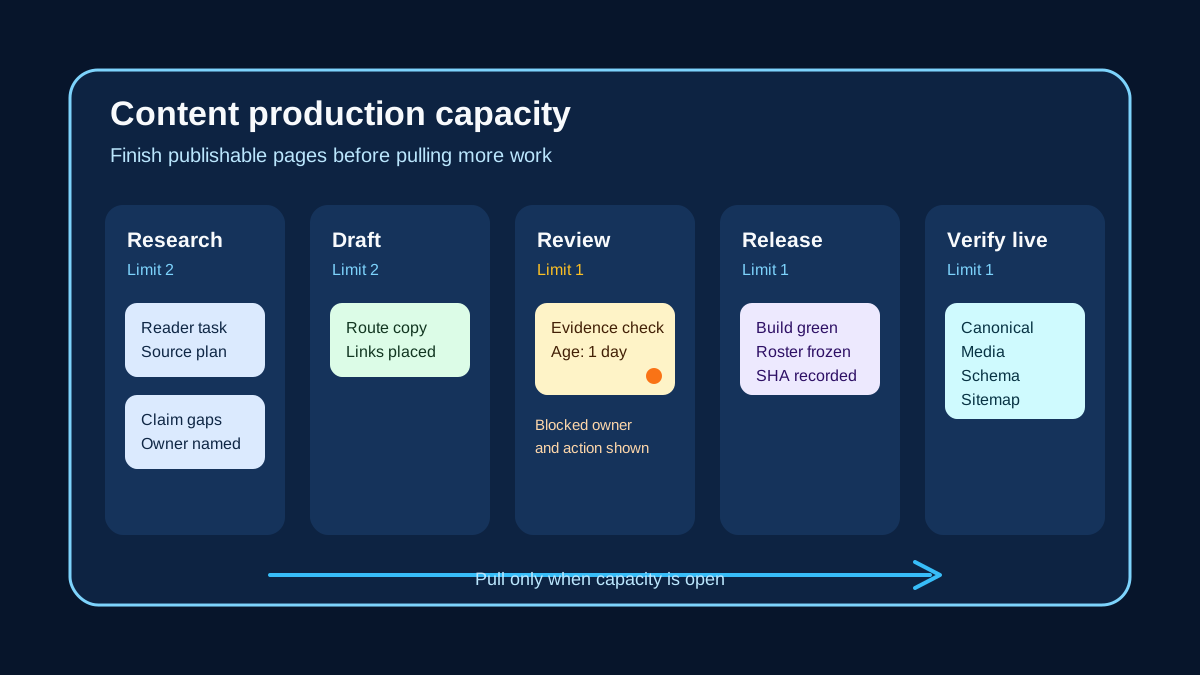
content production capacity board
A content production capacity board shows how much editorial work the team can finish, not how many ideas it can start. It follows each page through research, drafting, evidence review, editing, media, release checks, and live verification. When one stage fills up, the board makes that constraint visible before another draft joins the pile.
Count a page as active from the moment someone begins work until the live result passes its final check. A draft waiting for a claim review still consumes capacity because it carries context, decisions, and release risk.
Keep unscheduled ideas outside the active workflow. A separate request list can hold future work without making the production board look busier or more capable than it is.
Define the work that moves across the board
Choose one unit that people can recognize from start to finish. For a daily publishing routine, that unit is usually a route with a stable slug, brief, source plan, assigned editor, and acceptance checks. Do not mix article ideas, individual paragraphs, images, and complete pages as if they require comparable effort.
Write an entry rule for every active stage. Research may require an accepted reader question and named evidence gaps before work begins. Evidence review may require a complete draft, direct source links, marked claims, and a record of any unresolved inference.
Give each stage a finish rule as well. Edited does not mean someone opened the file; it means the agreed copy review is complete and every requested change has a disposition. Release ready should mean metadata, links, media, schema, tests, and route ownership are all settled enough for the repository gates.
Model the whole publishing path
A board that ends at draft complete hides much of the work. Add the states that routinely consume scarce attention: evidence review, editorial revision, media preparation, build repair, release approval, and live inspection. Keep a waiting state only when it represents a real queue with an explicit next owner.
Show who owns the next action on the card. A page that says review without naming the reviewer can sit untouched while everyone assumes somebody else has it. The owner field should change when responsibility moves, while the page history preserves the earlier handoff.
Use visible blocked markers without creating a separate graveyard column. Record the blocking condition, the person or dependency that can clear it, and the next check. The card should remain in the stage where flow stopped so the board continues to show the constraint.
Set limits where unfinished work accumulates
Start with an explicit maximum for each active stage or for a sensible group of stages. Base the first limit on observed review and release capacity, then adjust it from actual flow. The limit is a working policy, not a promise that every slot must stay occupied.
The Kanban Guide defines work in progress as items between the chosen start and finish points. It says teams should control that number and select new work when available capacity provides a clear pull signal. Applied to publishing, that means a free drafting slot is not enough when evidence review is already full.
When a limit is reached, help finish or unblock existing work before starting another page. An editor might resolve comments, locate a missing primary source, inspect media, or prepare the live route checklist. Starting new drafts protects personal busyness while making the system slower and harder to read.
Handle urgent work without disguising overload
Some work cannot wait for the normal queue. A factual correction, broken canonical, or inaccessible live asset may need an expedited path because the reader consequence is immediate. Define those qualifying conditions before the emergency appears.
An expedited item still consumes capacity. Mark which normal item paused, who approved the exception, and when the displaced work will be reconsidered. If every stakeholder request enters as urgent, the board has no useful admission policy.
Do not use an exception to bypass evidence or release checks. The team may shorten the path for a narrow repair, but it must still verify the changed claim or behavior on the canonical route. A broader rewrite can remain in the normal queue after the immediate defect is fixed.
Review age and blockers before output totals
Run the board review from right to left, beginning with pages nearest completion. Ask what prevents live verification, release, or review from finishing today. This order directs attention toward completed value instead of rewarding the newest idea.
Record when each item entered its active stage and when it became blocked. Age reveals a page that has stopped moving even when the column remains below its limit. A short note about the blocker and failed handoffs is more useful than a colored warning with no owner.
The Kanban Guide names work in progress, throughput, work item age, and cycle time as its minimum flow metrics. For an editorial board, those measures help diagnose the system, but they should not become writer quotas. Pair them with rework causes, validation failures, and escaped defects so speed does not hide quality loss.
Use the board to change production rules
Look for repeated congestion rather than blaming the card at the front of the queue. If claim review fills every week, the cause may be weak briefs, late sources, unclear review authority, or claims written beyond the evidence. Change the upstream rule that creates the repeat work.
Review a small sample of completed pages against the board history. Compare the stages, blocked time, revision loops, and release defects with the visible article. That check can show whether a fast path removed useful scrutiny or whether a stage exists only because ownership is vague.
Date each policy change and state what observation prompted it. Keep the old limit and rule in the decision record so the team can tell whether flow improved after the change. Adjust one meaningful constraint at a time when possible, since several simultaneous changes make the result difficult to interpret.
Close work only after live verification
A successful build or merged commit does not finish a publishing card. Record the immutable release, request the canonical URL, and inspect the title, H1, opening answer, byline, source link, internal links, media, metadata, schema, and sitemap entry. The board should show a separate live verification state until those checks pass.
If the deployment fails, move the card to the actual failed stage and name the next action. Do not return it to drafting unless the copy itself needs work. Preserving the failure location makes capacity planning more honest and gives later reviews a useful release history.
Close the card with the verification time, result, and reviewer. The finished count should represent pages readers can reach and use, not files that left a writer's desk.
Sources
- The Kanban Guide, Kanban Guides. Defines workflow, controlling work in progress, pull signals, active management, work item age, throughput, and cycle time for knowledge work.
Related GTM guides
Frequently asked questions
What belongs on a content production capacity board?
Track each accepted route from its defined start through research, drafting, evidence review, editing, media, repository checks, release, and live verification. Include the current owner, stage entry time, blocker, and next action without mixing future ideas into active work.
How should a publishing team choose work in progress limits?
Begin with observed review and release capacity, especially where unfinished pages already accumulate. Treat the first limit as an explicit policy, watch age and blocked work, and revise the limit from actual flow rather than keeping every person busy.
When is a page finished on the capacity board?
A page is finished after the immutable release is deployed and the canonical route passes its live checks for copy, byline, sources, links, media, metadata, schema, and sitemap inclusion. A draft, build, push, or deployment start is not the finish point.