
Search Console anomaly triage
A reproducible triage routine for separating Search Console measurement changes, demand shifts, indexing problems, ranking movement, and page defects.
Search Console anomaly triage
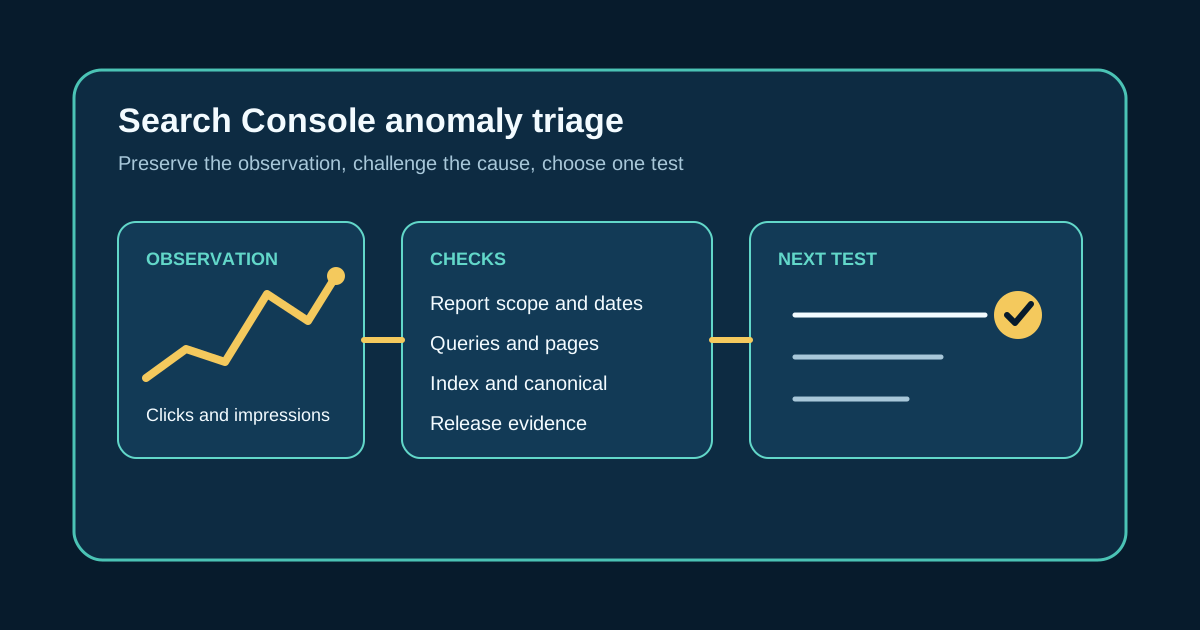
Search Console anomaly triage begins with a chart movement and ends with a bounded next test. It should not end with a confident story based on one line. A drop in clicks might reflect lower demand, fewer impressions, a different query mix, ranking movement, indexing trouble, a reporting issue, or a change on the page.
Write the observation before discussing causes. Name the property, report, search type, metric, date range, comparison period, affected pages, and the time the report was checked.
Keep the first note plain: clicks for this page group were lower in the comparison window. That gives the team something reproducible without assigning a cause before the checks begin.
Freeze the report view before exploring
A report can change meaning when someone switches from a property view to a page filter or replaces a date comparison with a device comparison. Save the active date range, search type, query filter, page filter, country, device, and search appearance. Record whether the current period contains incomplete or preliminary data.
Export the affected rows when the interface cannot preserve the working set. Keep the original export unchanged so another editor can repeat the observation.
Check the property identity as well. A domain property, an HTTPS URL prefix, and an older HTTP prefix can show different scopes. The wrong property can look like lost traffic even when the site itself did not change.
Describe the shape of the movement
Start with clicks and impressions, then use click through rate and average position as supporting context. A click decline with stable impressions has a different diagnostic path from a broad impression decline. Average position can help describe the pattern, but an aggregate can hide different movements among queries and pages.
Break the observation down by page and query. Ask whether the movement is concentrated in one route, a query theme, or most of the property. Then check country, device, and search appearance for a segment that changed more sharply than the total.
Do not assume the rows contain every query. Search Console omits anonymized queries and can limit the rows shown, so filtered table totals may differ from chart totals. Preserve that limitation in the note instead of treating the visible table as a complete census.
Check time, demand, and reporting context
Compare equivalent periods when the business has a weekly rhythm. A Monday to Sunday window should not be judged against a partial week that ends on Thursday. If seasonality is plausible, look at a comparable earlier period and write down why that period is relevant.
Review the Search Console data anomalies record for the affected dates and report type. A documented logging problem can explain reported movement without implying that readers or rankings changed. Keep the explanation within the issue's stated scope.
Next, inspect query demand. If impressions declined across stable positions for a coherent query group, lower search interest is a working explanation, not a final verdict. Check whether the same pattern appears across relevant pages and whether the comparison period contained a campaign, event, or seasonal peak.
Inspect indexing and release evidence
When impressions fall for a specific page, inspect that exact canonical URL. Search Console's URL Inspection tool shows Google's indexed view and offers a live test, which can help separate an index state from the current page response. Save the inspection time, declared canonical, Google selected canonical when available, crawl state, indexing status, and any blocking reason.
Compare those results with the release record. Check whether the route, canonical tag, robots directives, internal links, sitemap entry, status code, or rendered content changed near the first affected date. A nearby deployment deserves inspection, but timing alone does not prove that it caused the movement.
Request the live page and confirm that its title, H1, opening answer, media, links, structured data, and canonical markup match the accepted release. If Google's indexed view is older, keep recrawl state separate from copy quality.
Test editorial explanations last
Open the queries and pages that account for the movement, then read the live result and page together. Look for a changed title promise, missing answer, stale claim, broken section, or a mismatch between the query task and the opening. A broad rewrite is hard to justify when the evidence points to one outdated passage.
Compare the current page with the accepted earlier version. Name the exact wording or structure that could change reader behavior, and state the mechanism you expect. For example, a title may now describe a narrower task than the queries that still produce impressions.
Treat competitor pages and the visible result as dated observations. They can show that available answers changed, but they do not reveal Google's reasoning. Avoid claims about penalties or algorithm preferences without direct support.
Choose one discriminating test
A good next test separates at least two plausible explanations. If indexing is uncertain, inspect representative URLs and compare their indexed and live states before editing. If the movement is limited to mobile, verify the mobile page and segment rather than rewriting copy for every visitor.
Write what result would support the working diagnosis and what result would overturn it. An indexing explanation weakens when affected URLs are indexed, canonicalized as intended, and still earning stable impressions. An editorial explanation weakens when untouched pages serving the same query group show the same movement.
Assign an owner and a review time that fits the data. Do not schedule repeated daily edits while Search Console is still processing the first change. Preserve a null result because it prevents the next reviewer from running the same weak test and calling it new evidence.
Close the triage record without overclaiming
Close the record with the observation, checked explanations, surviving diagnosis, confidence, limitations, and next decision. Link the saved report view or export, URL inspections, release record, and any accepted page change. Another editor should be able to see why one action was chosen and why the alternatives were set aside.
Define labels such as confirmed, supported, unresolved, and rejected in the routine. Confirmed should require direct evidence of the mechanism. Unresolved is valid when the data does not separate the remaining causes.
If an edit is approved, verify the immutable release and the live route before watching the later report. The record should say what changed and which future observation will trigger another review. Search performance is an outcome to inspect, not a promise that the editorial team can make.
Sources
- Why did my site traffic drop?, Google Search Console Help. Documents checks for property scope, crawl and indexing state, site moves, seasonality, canonical selection, page usefulness, query and page segments, and known reporting changes when investigating a search traffic decline.
Related GTM guides
Frequently asked questions
What should a Search Console anomaly triage record capture first?
Capture the property, report, search type, metric, date range, comparison period, active filters, affected query and page sets, device, country, search appearance, and inspection time. Write the observed movement separately from any proposed cause.
Does a Search Console traffic drop mean a page needs rewriting?
No. Check the report scope, equivalent dates, query and page concentration, device and country segments, known data anomalies, indexing state, canonicals, and recent releases first. Edit only when the page evidence supports a specific reader problem.
When is Search Console anomaly triage complete?
Triage is complete when the record identifies the observation, preserves the report context, documents the explanations checked, selects a bounded next action, and states what evidence would overturn the working diagnosis. If the evidence cannot separate the causes, record the result as unresolved.